Serverless Workers
This page covers the following:
- What is a Serverless Worker?
- How Serverless invocation works
- Autoscaling
- Scaling with long-lived Workers
- Worker lifecycle
- Failure handling
- Constraints
- Compute providers
What is a Serverless Worker?
A Serverless Worker is a Temporal Worker that runs on serverless compute instead of a long-lived process. There is no always-on infrastructure to provision or scale. Temporal invokes the Worker when Tasks arrive on a Task Queue, and the Worker shuts down when the work is done.
A Serverless Worker uses the same Temporal SDKs as a traditional long-lived Worker. It registers Workflows and Activities the same way. The difference is in the lifecycle: instead of the Worker starting and polling continuously, Temporal invokes the Serverless Worker on demand, the Worker starts, processes available Tasks, and then shuts down.
Serverless Workers require Worker Versioning. Each Serverless Worker must be associated with a Worker Deployment Version that has a compute provider configured.
To deploy a Serverless Worker, see Deploy a Serverless Worker.
How Serverless invocation works
With long-lived Workers, you start the Worker process, which connects to Temporal and polls a Task Queue for work. Temporal does not need to know anything about the Worker's infrastructure.
With Serverless Workers, Temporal starts the Worker.
Worker Controller Instance
The Worker Controller Instance (WCI) is a system Workflow that scales Serverless Workers based on Task Queue conditions. One WCI Workflow runs per Worker Deployment Version that has a compute provider configured. The WCI runs in the same Namespace as your Worker Deployment.
The WCI responds to two triggers: sync match failures and
Task Queue backlog. When either trigger fires, the WCI produces a scaling action, such as
invoking the configured compute provider (for example, calling AWS Lambda's InvokeFunction API) to start new Workers.
For details on how scaling works, see Autoscaling.
You can list WCI Workflows in your Namespace:
temporal workflow list \
  --namespace <NAMESPACE> \
  --query 'TemporalNamespaceDivision = "TemporalWorkerControllerInstance"'
WCI Workflow IDs follow the pattern temporal-sys-worker-controller-instance:<deployment-name>:<build-id>. You can
inspect a WCI Workflow's history to see its recent Activity results:
temporal workflow show \
  --namespace <NAMESPACE> \
  --workflow-id 'temporal-sys-worker-controller-instance:<DEPLOYMENT_NAME>:<BUILD_ID>'
The following diagram illustrates the invocation flow of a Serverless Worker.
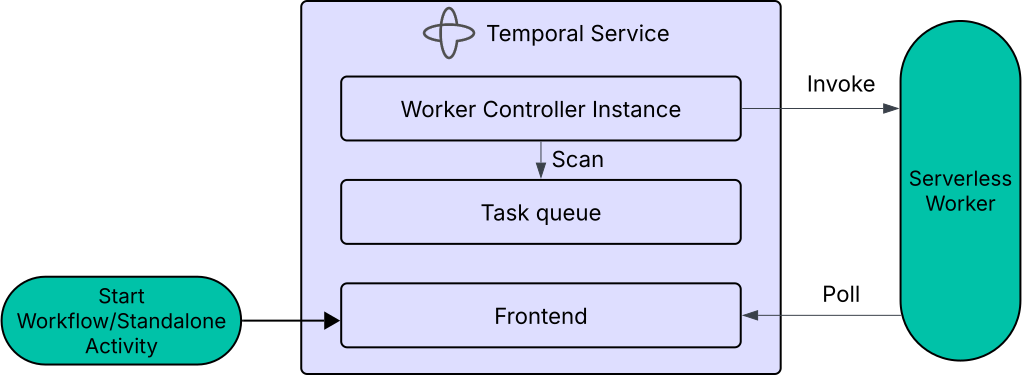
Temporal's Worker Controller Instance invokes a Serverless Worker when Tasks arrive on a Task Queue with a compute provider configured.
The invocation flow works as follows:
- A Task is submitted (for example,
StartWorkfloworScheduleActivity). - The Matching Service attempts to route the Task directly to an available Worker (a sync match).
- If a Worker is available, the Task is routed to that Worker.
- If no Worker is available (sync match fails), the Matching Service pushes a signal to the WCI, and the WCI invokes the configured compute provider.
- The Serverless Worker starts, creates a Temporal Client, and begins polling the Task Queue.
- The Worker processes available Tasks until it exits (see Worker lifecycle).
Each invocation is independent. The Worker creates a fresh client connection on every invocation. There is no connection reuse or shared state across invocations.
Autoscaling
The WCI automatically scales Serverless Workers based on Task Queue signals. When Tasks arrive and no Worker is available, the WCI invokes new Workers. When the Tasks are done, Workers exit and scale to zero.
The WCI uses two signals to decide when to invoke new Workers:
Sync match failure
When a Task is submitted, the Matching Service attempts to route it directly to an available Worker. If no Worker is available, the sync match fails, and the Matching Service pushes a signal to the WCI. The WCI then invokes a new Worker. This is the primary scaling path. Because the Matching Service pushes match failures to the WCI as they happen rather than the WCI polling on a timer, latency stays low and scaling is responsive.
Task Queue backlog
The WCI monitors Task Queue metadata to determine whether pending Tasks exist without enough Workers to process them. If there are Tasks on the queue and not enough Workers, the WCI invokes additional Workers.
Scaling with long-lived Workers
Serverless Workers can share a Task Queue with long-lived Workers. Because Serverless Workers are only invoked on sync match failure, Serverless Workers only pick up Tasks that no long-lived Worker was available to handle. In practice, the Serverless Workers act as spillover capacity for the long-lived fleet.
If you configure Serverless and long-lived Workers on the same Task Queue, do not enable dynamic scaling on the long-lived Workers. The two groups cannot coordinate their scaling behavior. If both scale dynamically, the long-lived Workers may scale up to handle the same Tasks that Temporal is simultaneously invoking Serverless Workers for, leading to unnecessary invocations and unpredictable scaling.
Worker lifecycle
A single Serverless Worker invocation has three phases: init, work, and shutdown.
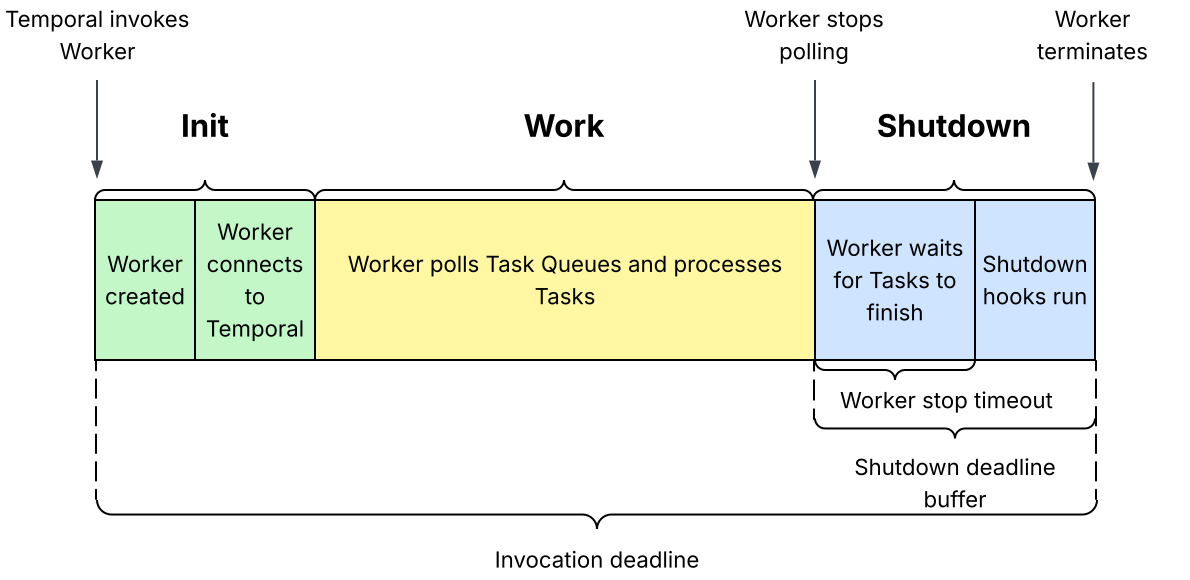
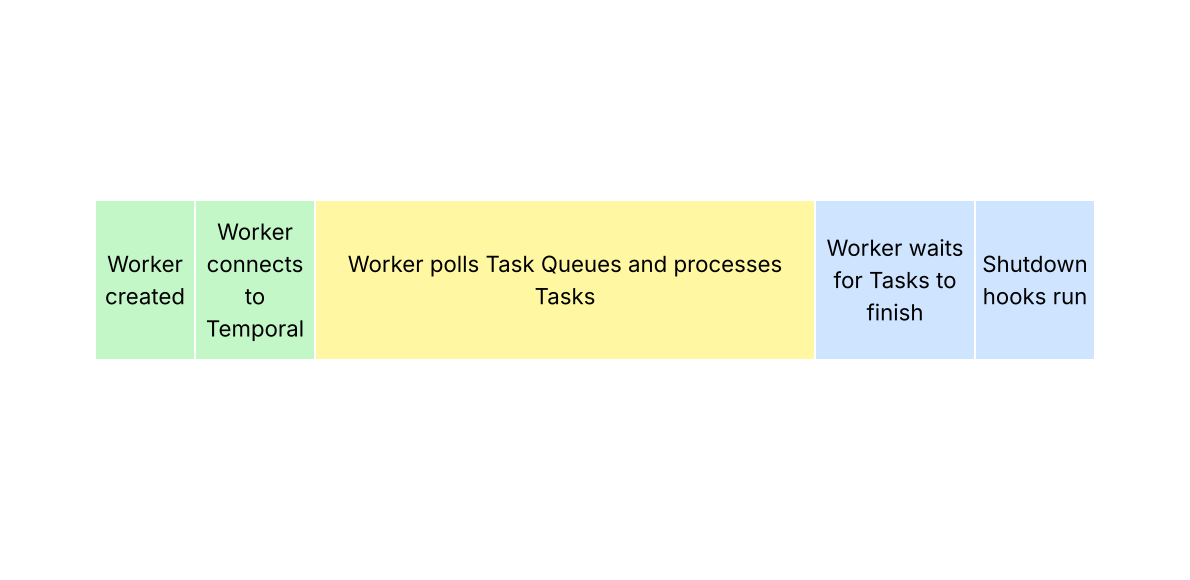
Diagram is not to scale. The shutdown deadline buffer controls when the Worker stops polling, and the Worker stop timeout controls how long the Worker waits for in-flight Tasks to finish before shutdown hooks run. Shutdown hooks typically take less than a few seconds.
During the init phase, the Worker initializes and establishes a client connection to Temporal.
During the work phase, the Worker polls the Task Queue and processes Tasks.
During the shutdown phase, the Worker stops polling, waits for in-flight Tasks to finish, and runs any shutdown hooks (for example, OpenTelemetry telemetry flushes). Shutdown begins before the invocation deadline so the Worker can exit cleanly before the compute provider forcibly terminates the execution environment.
Tuning for long-running Activities
If your Worker handles long-running Activities, set these three values together:
-
Worker stop timeout > longest Activity runtime. Gives in-flight Activities enough time to finish after polling stops.
-
Shutdown deadline buffer > Worker stop timeout + shutdown hook time. Ensures the drain and any shutdown hooks complete before the compute provider terminates the environment.
-
Invocation deadline > longest Activity runtime + shutdown deadline buffer. Set on the compute provider to give each invocation enough total runtime.
tipIf your longest-running Activity runs longer than half the maximum invocation deadline, this constraint may be difficult or impossible to meet. In this case, use Activity Heartbeats to record the state of the Activity execution so that the next retry can pick up where it left off.
For example, if your longest Activity runtime is 5 minutes, and your shutdown hooks take 3 seconds to run, set the Worker stop timeout to more than 5 minutes, and the shutdown deadline buffer to more than 303 seconds (5 minutes + 3 seconds). Set your invocation deadline to at least 10 minutes and 3 seconds (5 minutes + 303 seconds).
The Worker stop timeout controls how long the Worker waits for in-flight Tasks to finish after it stops polling. The shutdown deadline buffer controls how much time before the invocation deadline the Worker stops polling for Tasks.
Raising only the shutdown deadline buffer makes the Worker stop polling earlier, but does not give in-flight Tasks any more time to complete.
Raising only the Worker stop timeout does not make the Worker stop polling earlier, which means the compute provider might terminate the Worker before the full stop timeout completes. In-flight Activities then do not get the full stop timeout to finish, and the shutdown hooks may not run.
Failure handling
Serverless Workers rely on Temporal's standard retry and timeout semantics to recover from failures. The following sections describe common failure scenarios and how they are handled.
Worker crash
If a Worker invocation crashes (out of memory, unhandled exception, etc.), the behavior follows standard Temporal retry semantics:
- The Activity Timeout fires after the configured duration.
- Temporal retries the Activity on a different Worker invocation.
- No manual intervention is required.
Provider concurrency limit
If the compute provider's concurrency limit is reached (for example, AWS Lambda account concurrency):
- Further invocations from the WCI fail.
- Tasks remain in the Task Queue backlog. No data loss occurs.
- Processing slows until concurrency frees up.
Resource exhaustion across Activity slots
By default, a single Worker invocation may run multiple Activity slots. A crash or resource exhaustion in one Activity (for example, out-of-memory from a memory-intensive operation) can affect other Activities running in the same invocation.
To isolate Activities from each other:
- Split Workflow and Activity Workers into separate compute functions.
- Set Activity slots to 1 per invocation.
With single-slot configuration, each Activity gets a dedicated execution environment.
Constraints
| Constraint | Detail |
|---|---|
| Activity duration | Must complete within the compute provider's invocation limit (minus shutdown deadline buffer). For AWS Lambda, the maximum is 15 minutes. |
| Workflow duration | No limit. Workflows of any duration work, regardless of the invocation timeout. A Workflow runs across as many invocations as needed. |
| Worker code | Same Temporal SDK Worker code, using the serverless Worker package for your SDK. |
| Versioning | Worker Versioning is required. Each Workflow must have an AutoUpgrade or Pinned behavior, set per-Workflow or as a Worker-level default. See Worker Versioning with Serverless Workers. |
Worker Versioning with Serverless Workers
Serverless Workers require Worker Versioning, and the compute provider must invoke a stable, immutable build for each Worker Deployment Version. With AWS Lambda, this means aligning two versioning systems:
- Temporal Worker Deployment Versions — identified by deployment name and Build ID. Each Workflow runs against a specific Worker Deployment Version (Pinned) or moves between them on routing changes (Auto-Upgrade).
- AWS Lambda function versions — immutable numbered snapshots of your Lambda function code (
1,2,3, ...).
A Worker Deployment Version is an immutable build identifier. For production workloads, keep the Lambda function code it
invokes immutable as well: map each Worker Deployment Version to exactly one Lambda function version, and configure the
compute provider with the qualified
versioned ARN for that Lambda version (for
example, arn:aws:lambda:us-east-1:123:function:my-worker:5).
For development or non-critical workloads, you can use an unqualified ARN to iterate without publishing a new Lambda function version each time.
An unqualified ARN (no version suffix) points at $LATEST, which changes on every redeploy. Without a versioned ARN,
deploying replay-unsafe code causes non-determinism errors for in-flight Workflows, even for Workflows annotated as
Pinned.
How the Versioning Behavior changes rollout
The choice of Pinned or Auto-Upgrade controls how Workflows move between Worker Deployment Versions in Temporal. It does not change how a Worker Deployment Version targets Lambda. Both behaviors expect a versioned ARN that points at one immutable Lambda function version. The following table shows what happens to existing Workflows when you set a new Current Version, with and without versioned Lambda ARNs.
| Versioning Behavior | With versioned Lambda ARN | Without versioned Lambda ARN |
|---|---|---|
| Pinned | Existing Workflows stay on their original Lambda function version until they complete. | Existing Workflows stay on their original Worker Deployment Version, but the underlying Lambda code has already changed since $LATEST updated at redeploy. The new code must be replay-compatible. |
| Auto-Upgrade | Existing Workflows move to the new Worker Deployment Version and its new Lambda function version at the next Workflow Task after you move the Current Version. | The Lambda redeploy already changed the code for all versions. Setting the Current Version only changes routing, not which code runs. |
For step-by-step instructions on publishing Lambda versions and configuring the compute provider with a versioned ARN, see Publish a Lambda function version.
Compute providers
A compute provider is the configuration that tells Temporal how to invoke a Serverless Worker. The compute provider is set on a Worker Deployment Version and specifies the provider type, the invocation target, and the credentials Temporal needs to trigger the invocation.
For example, an AWS Lambda compute provider includes the Lambda function ARN and the IAM role that Temporal assumes to invoke the function.
Compute providers are only needed for Serverless Workers. Traditional long-lived Workers do not require a compute provider because the Worker process lifecycle is not managed by the Temporal server.
Supported providers
| Provider | Description |
|---|---|
| AWS Lambda | Temporal assumes an IAM role in your AWS account to invoke a Lambda function. |